
Tables
A Table is a relational table listed in the model's navigation panel. Unlike a Cube, a Table is flat: rows and typed fields, with no dimensions, hierarchies or aggregation.
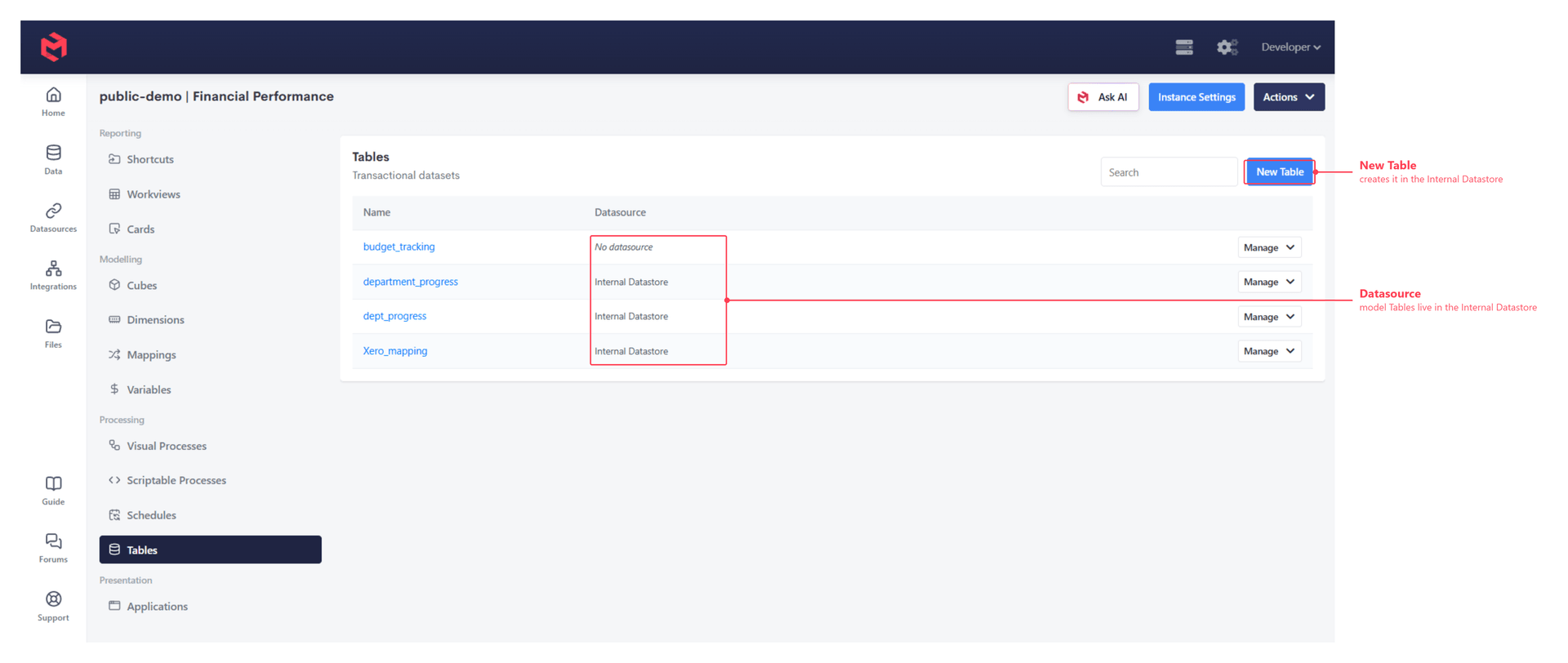
Tables are always created against the Internal Datastore - the MySQL (MariaDB) database that ships with every instance. Because the table lives in a database rather than in the model's memory, it can be queried with SQL from a Card, a Custom Page or a Process.
The Tables section is for MODLR's own tables
The Tables section shows only tables created within the MODLR instance. Tables in external databases connected through Manage Datasources don't appear here, even though a Process can read and write them freely. See Tables vs. external datasources below.
What Tables are for
A few patterns account for most Tables in a model:
- ETL staging. Raw rows from a source system are loaded into a Table first, then read back, cleaned and mapped into Dimensions and Cubes by a Process. Staging the data makes the load restartable and gives you somewhere to inspect what actually arrived when a build goes wrong.
- Structured storage that isn't multidimensional. Data that has no natural place in a cube - a register of comments, an approval log, a user-maintained chart of accounts - is a poor fit for a Cube but a natural fit for a Table. The Account Dimension example uses exactly this: a user-defined chart of accounts held as records in a Table, loaded into a hierarchy nightly.
- Archiving cube data. Writing a cube's values out to a Table keeps a closed period or a submitted version available for later use without holding it in the model.
- Transactional processing of large datasets. MODLR is built for dimensional data, not transactional. Where the work is genuinely row-by-row across a large transactional dataset - a dimensional profitability model allocating at transaction level, for example - that processing is far better done in SQL against a Table. MODLR is then the output of that model rather than the engine behind it, and a good orchestrator of it: a Process runs the SQL, and a Card or Custom Page gives users a screen to trigger and monitor it from.
Landing transactional data at its most granular level
When a Process pulls transactional data from an external source, it's usually worth storing it in a Table at the most granular level available, rather than only the aggregate the model consumes. Keeping the detail inside the instance is what makes in-system drill-through possible.
A Profit and Loss cube populated at summary level is the typical shape: a drill-through page behind a cell queries the Internal Datastore Table for the transactions making up that number. Either source works - the drill could query the original database over JDBC instead - but going to the Internal Datastore keeps it fast and independent of the source system being reachable. See Drill Down to SQL for building one.
Creating a Table
Open Tables (under Processing in the model's navigation panel) to see the Tables in the model. Every model Table is listed against the Internal Datastore it lives in.
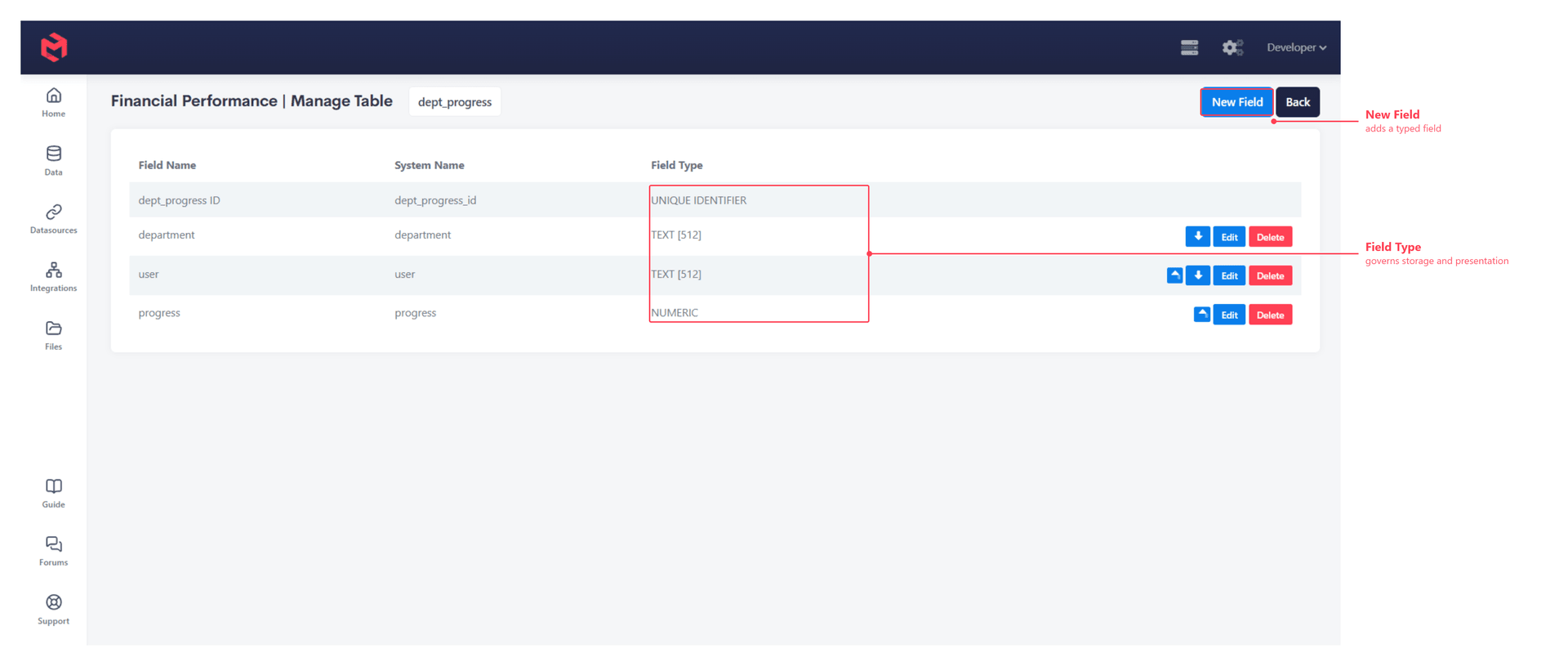
Opening a Table gives you the Table Interface, where its fields are added and edited.
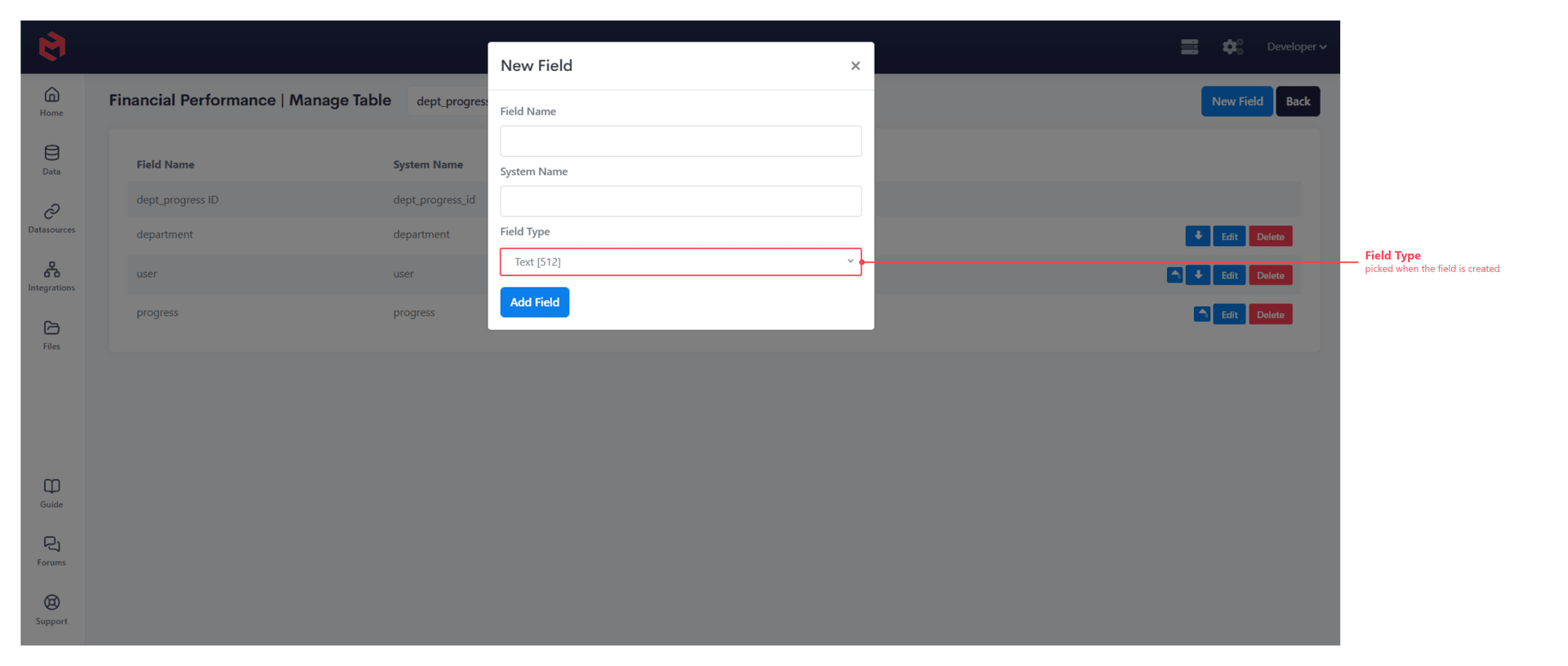
New Field names the field and sets its type:
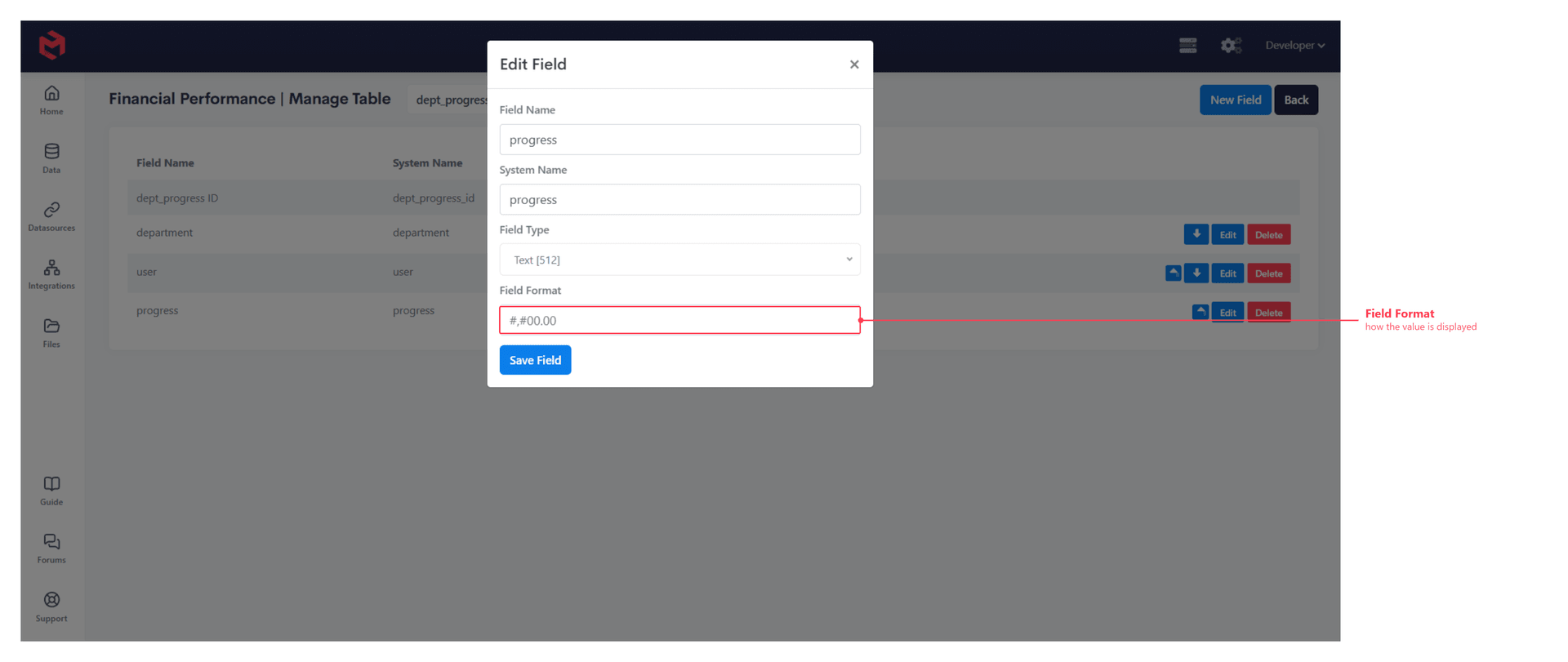
Edit on an existing field changes the same properties, and adds Field Format - how the stored value is displayed:
The same is available from a Process:
js
table.create("Internal Datastore", "users");
table.fieldAdd("users", "password", "Text [512]");
table.create takes the datasource as its first argument, which for a model Table is always "Internal Datastore". The remaining functions address a table by name alone.
| Function | Purpose |
|---|---|
table.create | Create a table in the Internal Datastore. |
table.exists | Test whether a table is already present. |
table.list | List every table. |
table.fieldAdd | Add a typed field. |
table.fields | List a table's fields. |
table.fieldExists | Test for a field. |
table.fieldRemove | Remove a field. |
table.truncate | Clear every row, keeping the structure. |
table.delete | Drop the table. |
Truncate before a rebuild
A staging Table is normally emptied at the start of each load with table.truncate, so the Process works against only the rows from the current run.
Field types
Fields are typed, and the type governs both storage and how the field is presented in Cards and Custom Pages that read it.
| Category | Types |
|---|---|
| Text | TEXT [55], TEXT [512], TEXT [25, 000], TEXT FORMATTED [25, 000], TEXT [LIST] |
| Numeric | NUMERIC, CALCULATED NUMERIC |
| Calculated text | CALCULATED TEXT |
| Date and time | DATE, TIME, DATE TIME |
| Audit | DATE TIME CREATED, DATE TIME LAST UPDATED, USER ID CREATOR, USER ID LAST MODIFIED |
| Identity | UNIQUE IDENTIFIER, REMOTE IDENTIFIER, USER ID |
| Other | FILE ATTACHMENT, YES OR NO |
The audit types are maintained by MODLR rather than written to directly - DATE TIME CREATED and USER ID CREATOR are stamped when a row is inserted, and DATE TIME LAST UPDATED and USER ID LAST MODIFIED each time it changes. REMOTE IDENTIFIER is intended for the key a row carries in the system it was loaded from, which is what makes an incremental reload possible.
Reading and writing rows
Table structure is managed with the table.* functions above; the rows are read and written as SQL against the Internal Datastore, since that's where they live:
datasource.client- the current interface for running SQL against a datasourcedatasource.select/datasource.insert/datasource.update- the earlier, now-deprecated equivalentsdatasource.createBatch- batched writes, for loading many rows efficiently
The same data is reachable outside a Process too: see How to use Datasource data in MODLR, and the SQL Table and SQL Trigger card components.
Tables vs. external datasources
MODLR connects to any JDBC-based database, so a Process can read from and write to a warehouse, a finance system's database, or any other external source configured under Manage Datasources. That's a different thing from a model Table, and the distinction is worth being clear about:
| Model Tables | External datasources | |
|---|---|---|
| Where the data lives | The instance's Internal Datastore | A database outside MODLR, reached over JDBC |
| Listed in the model's Tables section | Yes | No |
| Created and structured by | The Table Interface, or the table.* functions | The external system - MODLR connects to what's already there |
| Read and written by a Process | Yes | Yes |
| Set up under Manage Datasources | Already present on every instance | Yes, per connection |
The Tables section is scoped to tables MODLR itself owns. An external datasource's tables are fully usable from a Process - and often are, as the source a staging Table is populated from - but MODLR doesn't manage their structure, so they aren't listed as model objects.
Which to reach for
Use a Table when MODLR should own the data: staging rows mid-load, or storing something the model itself produces. Use an external datasource when the data is owned elsewhere and MODLR is reading it. A common load does both - query the external datasource, write the rows into a Table, then build Dimensions and Cubes from the Table.
Related
- Model Objects - where Tables sit among the model's other object types
- Table Functions - the full process function reference
- Datasources - connecting to external databases over JDBC
- Adding a JDBC Driver - supporting a database MODLR doesn't ship a driver for
- Accessing MySQL Directly - querying the Internal Datastore outside MODLR