
Designing a Dimension
INFO
The examples on this page are drawn from Excel, since that's the most common starting point when a Dimension is first being identified. The methodology itself isn't Excel-specific - the same questions apply whether the existing model lives in a spreadsheet, another planning tool, or a source system's own data structure.
Spotting shadow dimensions
The dimensions a Model needs are rarely written down anywhere - in an existing spreadsheet, they're encoded as layout instead. These hidden dimensions are called shadow dimensions, and learning to spot them is the first step in designing a Model.
Shadow dimensions typically hide in:
- Tab names - twelve tabs named
Jan,Feb,Mar... mean Time is a shadow dimension. - File names -
2023_Plan.xlsx,2024_Plan.xlsxmean Year is a shadow dimension pushed all the way up to the file system. - Repeated row or column blocks - the same set of accounts repeated once for Actual, once for Budget, once for Forecast means Scenario is a shadow dimension hiding in the row layout.
- Section headers and merged cells - a sheet split into
Department: FinanceandDepartment: Marketingsections means Department is a shadow dimension expressed as a visual break. - Suffixes or prefixes in labels - account labels like
Revenue - AU,Revenue - NZcontain a Region shadow dimension expressed as a naming convention.
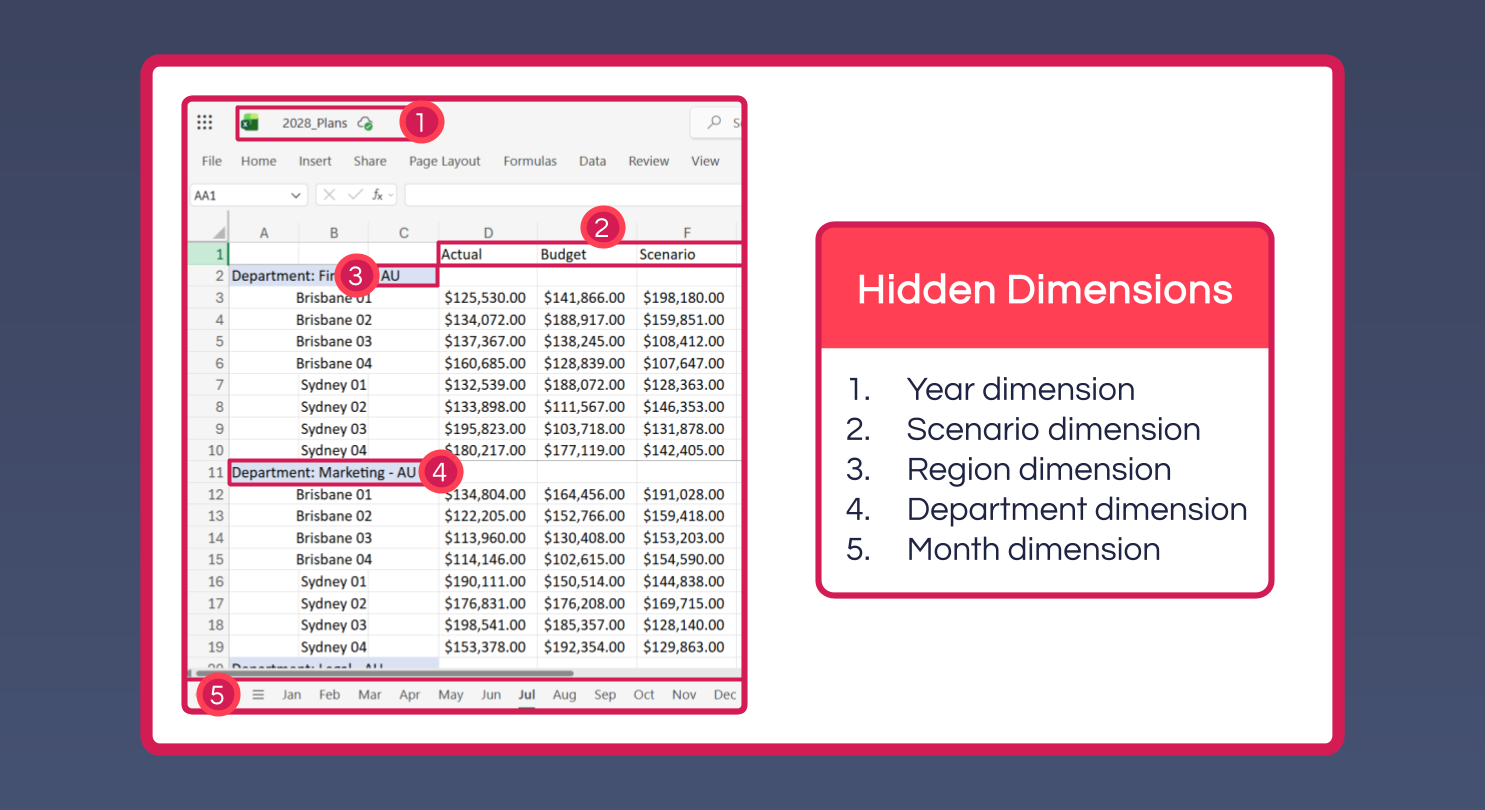
A useful habit when auditing an existing workbook: repetition is a clue (whatever varies between two similar blocks is usually a dimension), sub-totals are clues to hierarchies, and hidden rows, columns or sheets often hold the most important shadow dimensions of all - always unhide them first.
Four core decisions
Once a dimension has been identified, four decisions shape how well it performs and how easy it is to maintain.
1. What is the grain? The grain is the lowest level of detail the dimension tracks - if Time's grain is month, the model can never report at the day or week level. Finer grain enables more detailed reporting but costs more memory and calculation time, and it's wasted if the source data feeding the model is never that detailed in the first place. Set the grain to match the most detailed report the model genuinely needs to produce, no finer.
2. What Hierarchies does it need? A single Dimension can carry several Hierarchies over the same leaf Elements, each rolling them up a different way for a different audience - a Default Hierarchy following the chart of accounts, a Management View Hierarchy grouping accounts the way executives think, a Cash Flow Hierarchy organised around operating/investing/financing categories. If two stakeholders want fundamentally different roll-ups of the same data, or a roll-up is being computed in a formula rather than declared as structure, that's usually a sign a Hierarchy is missing.
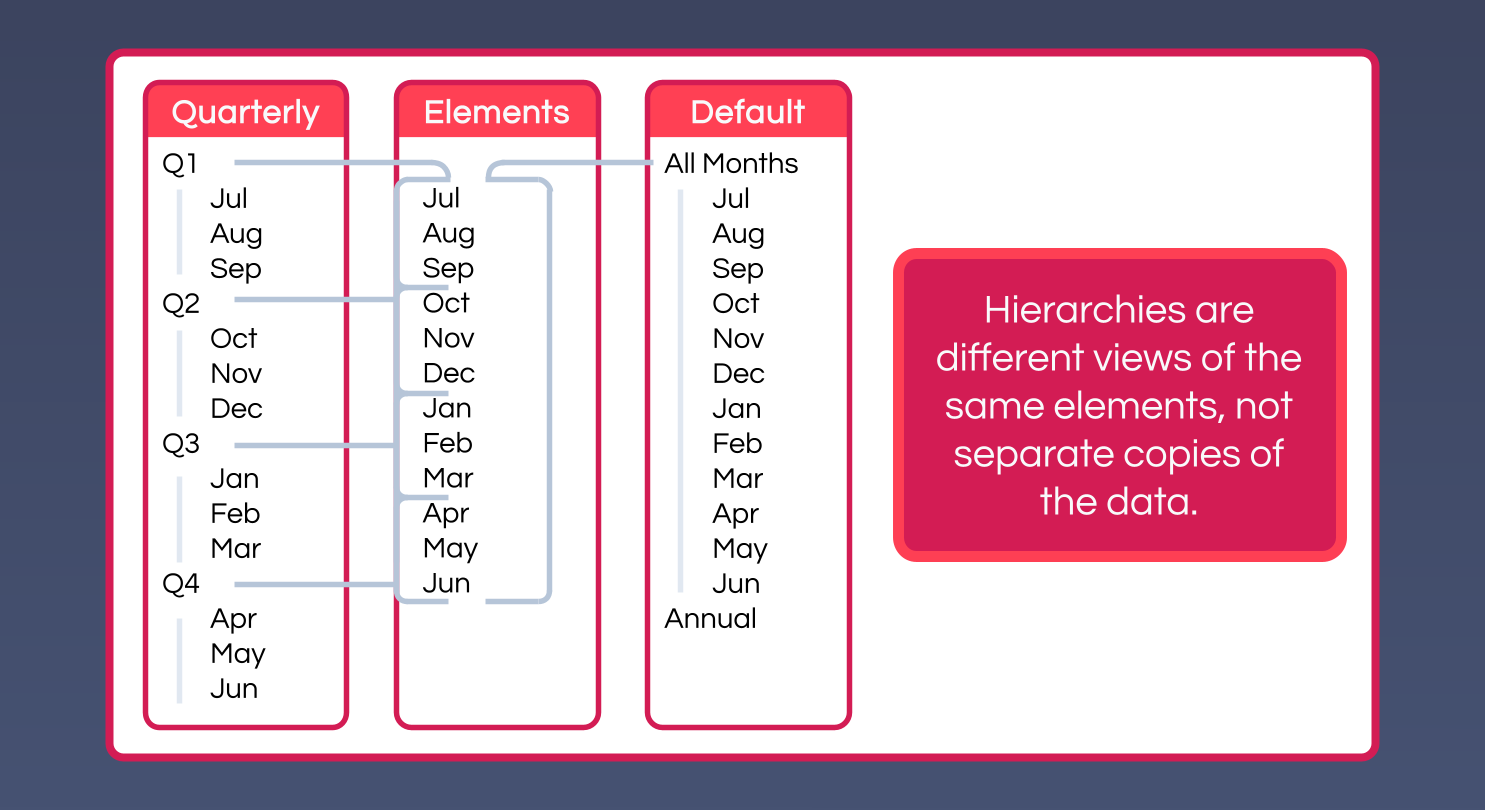
3. Should this be a Dimension, or a Hierarchy within one? This is the trickiest of the four. A geography structure like Region → Country → City is almost always one Location Dimension with a Hierarchy, because reports only ever need one level at a time (with drill-up or drill-down). By contrast, Department × Account is genuinely cross-tabulated - reports regularly want departments on rows and accounts on columns, or vice versa - so those need to be separate Dimensions. The rule of thumb: Dimensions are independent axes that get cross-tabulated against each other; Hierarchies are levels within a single axis.
4. What safety nets does it need? Any Dimension fed by an external system needs safety net Elements to catch data that doesn't fit cleanly:
Unspecified [Dimension]- for data that legitimately belongs to the Dimension but arrived without a category, e.g. a sales record missing a product code. This Element rolls up under the normal totals, so reconciliation still works.No [Dimension]- for data that genuinely isn't categorised by the Dimension at all, e.g. a global price list that applies to every region, which lives underNo Regionrather than being duplicated against every region. This Element typically sits outside the main roll-up.
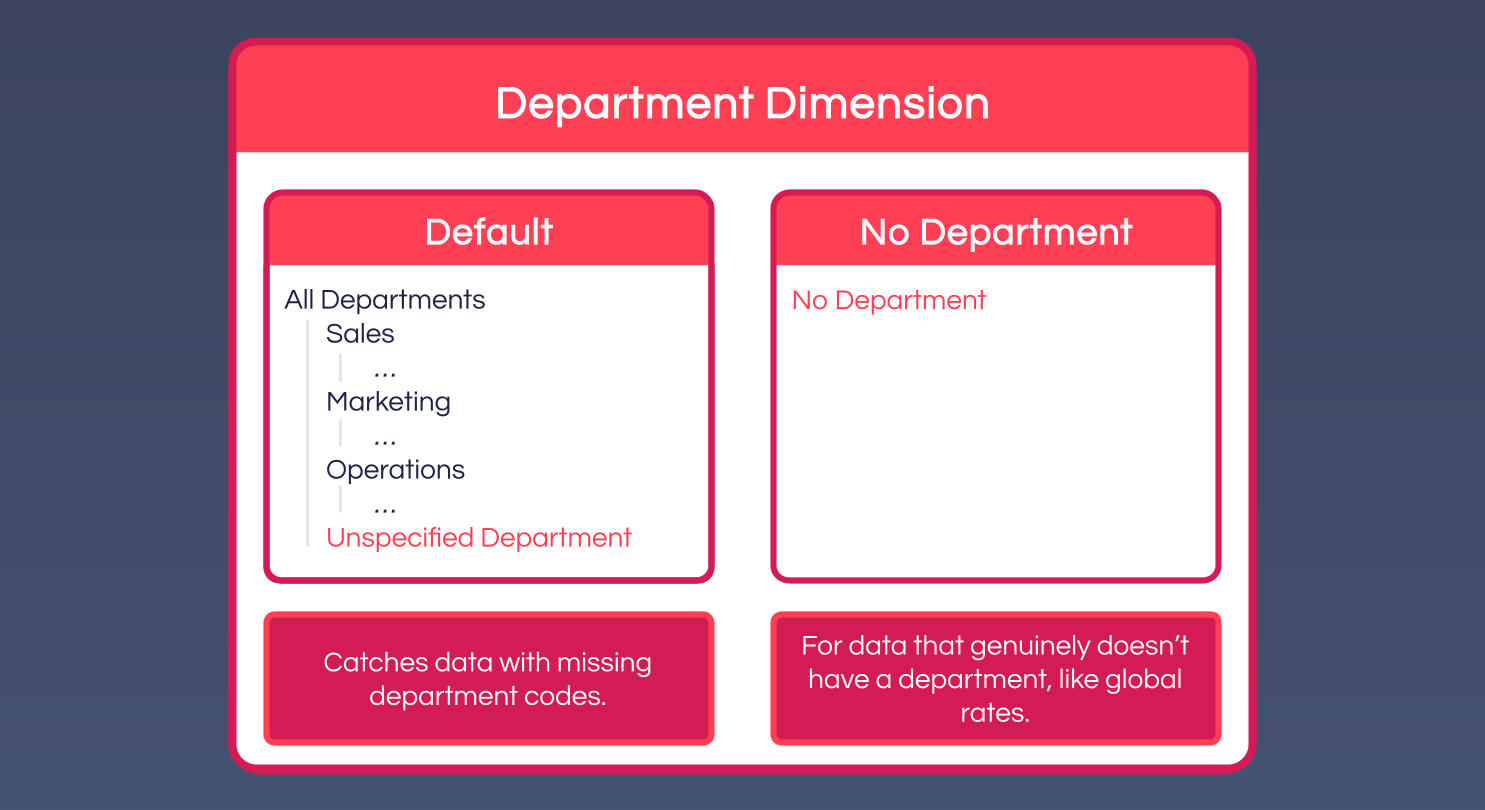
Without safety nets, an automated load breaks the moment the source system produces a record that doesn't match expectations. With them, the model degrades gracefully: the data still loads, still reconciles to source totals, and is visibly flagged for investigation.
Naming elements from a source system
It's tempting to take the human-readable name straight from a source system and use it as an Element's principal name - a Customer dimension with elements like Acme Corporation, an Account dimension with elements like Salaries and Wages. It reads well immediately, but the moment the source system renames something (Acme Corporation becomes Acme Global), the next integration run sees it as a brand new Element. The old Element - and all its historical data - is orphaned, and every formula, Workview or Card that referenced it by name breaks.
The more durable pattern:
- Use the stable code from the source system as the principal Element name - account codes, customer IDs, SKUs - since these are designed to be permanent identifiers and don't change when a name does.
- Zero-pad numeric codes (
0001,0013rather than1,13) for consistent sorting and a uniform appearance. - Add the human-readable name as an Alias, populated from the source system on every integration run. When the source name changes, only the Alias updates - the underlying Element, and its historical data, stays exactly where it is.
- Add a combined
Code - NameAlias (e.g.5-10110 - Purchasing Spend) as the one usually displayed in reports, since it carries both the stable identifier and the human meaning.
| Element (principal) | Alias: Name | Alias: Code - Name |
|---|---|---|
4-11010 | Salaries and Wages | 4-11010 - Salaries and Wages |
5-10110 | Purchasing Spend | 5-10110 - Purchasing Spend |
6-10010 | Services Revenue | 6-10010 - Services Revenue |
When 5-10110 is later renamed to Purchasing and Procurement Spend in the source system, only the two Aliases update - the Element, and everything that references it, is untouched.
Common Design Mistakes
- Over-dimensionalising - adding a Dimension "just in case" isn't a storage problem (MODLR doesn't store or traverse empty cells), it's a friction problem: every Excel
CubeGet, everycube.set/cube.getcall, every Workview and everyLINKformula touching that Cube now has to account for it. If the default Element for a Dimension isAll [Dimension]orNo [Dimension]the vast majority of the time, the data probably doesn't need that Dimension. - Under-dimensionalising - concatenating two concepts into one Dimension, e.g. Account elements named
Sydney Revenue,Melbourne Revenue,Sydney Cost,Melbourne Cost. This collapses Region and Account together and makes it impossible to pivot a report by either independently. - Treating Measures as separate Cubes - Units, Revenue and Cost don't need three Cubes; they're three Elements of one Measures Dimension inside a single Cube.
- Treating Scenarios as separate Cubes - Actual, Budget and Forecast belong as Elements of a Scenario Dimension in one Cube. Variance reporting (
Actual - Budget) is trivial when they share a Cube; it's painful inter-cube linking when they don't. - Skipping safety nets - a Dimension built without
Unspecified [Dimension]andNo [Dimension]Elements works fine until the first record the source system sends without a category, at which point the load starts failing or silently dropping data. - Forgetting Dimensions are shared - a Dimension belongs to the Model, not to any one Cube. If five Cubes use
Departmentand a new department is added, all five see it immediately. Plan changes with every consuming Cube in mind.