
Hybrid Dimension Builds
A Dimension doesn't have to be either fully manual or fully Process-driven - many real Dimensions are a hybrid, where some Hierarchies are entirely automated and others are deliberately left for a person to curate. This is worth designing for up front, since it changes how the Dimension is structured from the start.
Why a hybrid build is sometimes necessary
A Process that rebuilds a Dimension from a source system every night is clean and powerful, and it's what most production Dimensions look like at scale - but the source system doesn't always know everything a Model needs it to know. An Account Dimension fed from an ERP knows every account that exists and which legal entity it belongs to; it has no opinion on how the management team wants those accounts grouped for internal reporting. A common shape is a Default Hierarchy that mirrors the statutory chart of accounts (fully automated from the ERP) alongside a Management View Hierarchy that groups accounts the way executives think about them (curated by a person, because the ERP simply has no information to automate it with).
The same shape shows up elsewhere: a Product Dimension where the SKU list comes from the ERP automatically but marketing wants to maintain a Hierarchy grouping products by campaign or theme; a Customer Dimension where the customer list comes from a CRM automatically but sales wants a Hierarchy grouping customers by territory; a Department Dimension where the org structure comes from HR automatically but a manager wants a Hierarchy reflecting their own team structure for capacity planning. In each case, the underlying Element list and the Default Hierarchy are automated, but one or more additional Hierarchies are deliberately left to a human, because the source system has no opinion about them.
The Unmapped pattern
The hard part of a hybrid build is what happens when the source system produces a new Element. The automated Default Hierarchy picks it up on its next rebuild without any trouble - but the curated Hierarchy doesn't know it exists, and without a mechanism to catch it, the new Element is invisible in every report built against the curated Hierarchy.
The standard fix is to give the curated Hierarchy a root parent named something like Unmapped Account or Unmapped Product, and have the automation place any Element that isn't already positioned somewhere in the curated Hierarchy under that parent instead of leaving it out entirely.
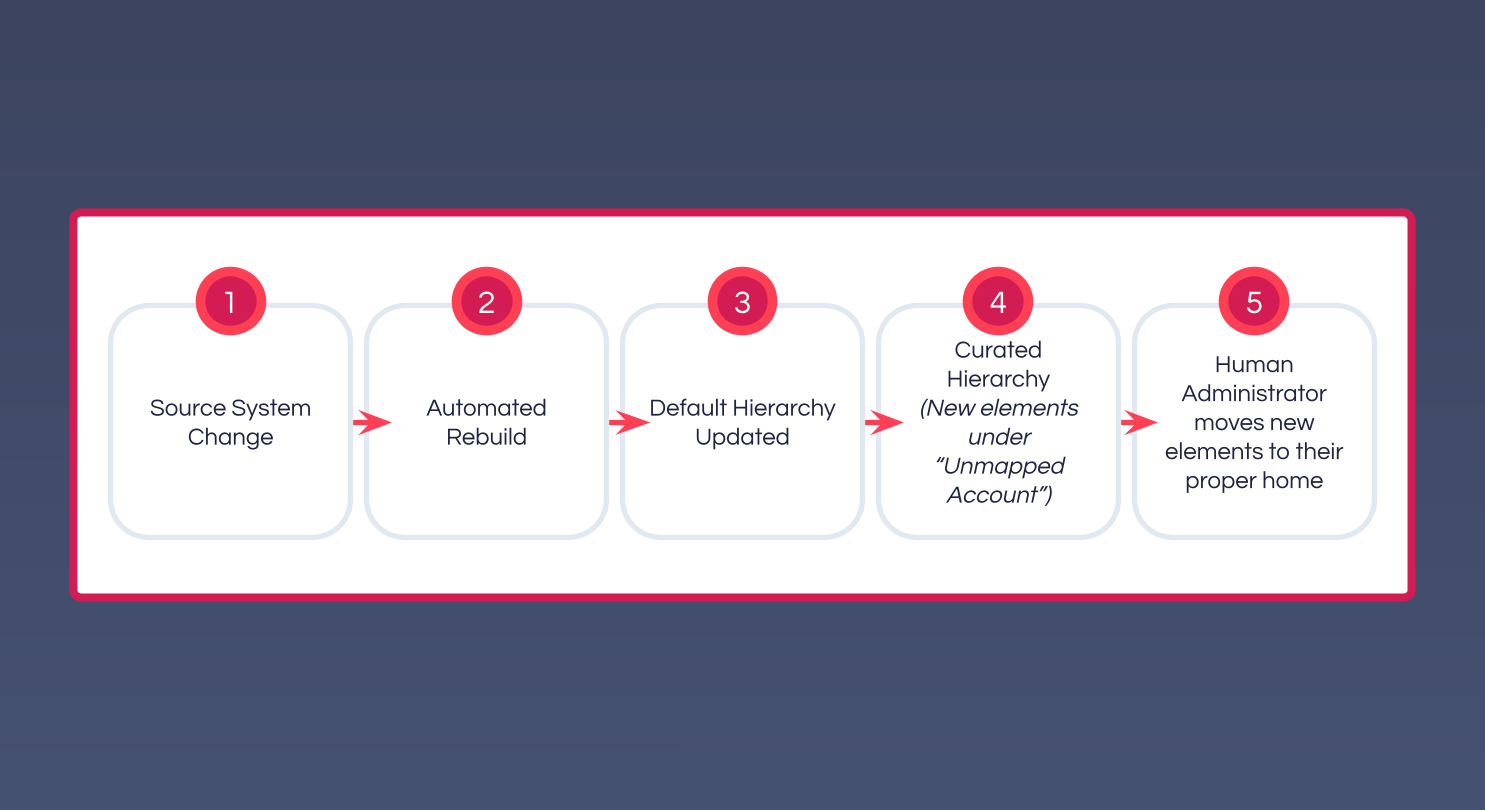
The lifecycle:
- A scheduled Process refreshes the Dimension from the source system.
- New Elements appear in the source data.
- The
DefaultHierarchy picks them up automatically as part of its rebuild. - The curated Hierarchy is checked - any source Element not already placed somewhere in it gets placed under
Unmapped [Dimension]. - An administrator notices the new entries under
Unmapped [Dimension]and moves them to where they belong in the curated structure. - On the next run, those Elements are already placed, so they aren't re-added to
Unmapped [Dimension].
This works because it gives the automation a safe default for Elements it doesn't have an opinion about, without losing the human-curated structure that already exists. New Elements never silently disappear from the curated view - they sit under Unmapped [Dimension] until someone deals with them.
Example
A step in a Department dimension's rebuild Process that maintains an Unmapped Department bucket on one or more curated Hierarchies looks like this:
js
var dimName = "Department";

// Every hierarchy that should never silently lose a new element
var hierarchiesToCheck = ["Default", "Management View"];

// Safety-net / system elements - never park these under Unmapped
var elementsToIgnore = ["No Department", "Unspecified Department"];

var elements = JSON.parse(dimension.elements(dimName, 0, 100000000));

for (var i = 0; i < hierarchiesToCheck.length; i++) {
    var hierName = hierarchiesToCheck[i];
    var unmappedParent = "Unmapped " + dimName + " (" + hierName + ")";

    // Clear last run's Unmapped bucket before re-checking. Anything a human has
    // since moved into its proper place in the hierarchy won't be re-added below,
    // since hierarchy.hasMember() will find it in its new position instead.
    if (hierarchy.hasMember(dimName, hierName, unmappedParent)) {
        hierarchy.unwind(dimName, hierName, unmappedParent);
    }

    for (var j = 0; j < elements.length; j++) {
        var elm = elements[j];

        if (elementsToIgnore.includes(elm)) continue;

        // Guards against the Unmapped parent becoming its own child - if
        // someone finishes mapping every element but saves the hierarchy with
        // the Unmapped parent still present as a normal member (rather than
        // deleting it outright), this stops it from re-adding itself.
        if (elm === unmappedParent) continue;

        // Already placed somewhere in this hierarchy - nothing to do
        if (hierarchy.hasMember(dimName, hierName, elm)) continue;

        hierarchy.group(dimName, hierName, unmappedParent, elm);
    }
}
The hierarchy.unwind() call at the top of each hierarchy's loop is what makes this idempotent - without it, an Element a human already moved out of Unmapped would stay correctly placed, but the emptied-out Unmapped branch from last run would just sit there unchanged rather than being rebuilt fresh each time.
Designing for it
If a Hierarchy is going to be hybrid, plan for it before building it:
- Record which Hierarchies are automated and which are curated - in the Dimension Registry if the Model has one, so a future modeller knows which Hierarchies they can safely edit and which will be overwritten on the next automation run.
- Build the
Unmapped [Dimension]parent into the curated Hierarchy when it's first created, not after the first new Element catches everyone by surprise - the pattern only works because the parent already exists when the automation needs it. - Make the automation's own logic and comments explicit about scope - a Process maintaining a hybrid Dimension should say plainly what it owns: "this Process maintains the
DefaultHierarchy and the underlying Element list;Management Viewis human-curated, and this Process only adds new Elements to itsUnmappedparent." - Assign the human responsibility explicitly. A curated Hierarchy needs someone in the business responsible for keeping it organised - that's a team decision the platform can't make on its own, and it's worth confirming before the Model is built around the assumption that someone will do it.
Common variations
Two extensions to the base pattern show up regularly once a Model has been running for a while:
- Auto-archiving removed elements. When the source system retires an Element (a department closes, an account is retired), the automation can move it into a holding area in the curated Hierarchy (e.g.
Retired Accounts) instead of deleting it outright, preserving historical reporting against the curated structure without cluttering the active areas. - Notifying on new entries. Rather than relying on someone to remember to check
Unmapped [Dimension], the rebuild Process can count its Elements after each run, compare against the previous count, and send an email or SMS when something new has appeared - turning the pattern from passive to active.
Both are easy to add once the base pattern is in place, and both tend to matter most six months into a Model's life, once a curated Hierarchy that nobody is actively watching has quietly started drifting out of date.
A common mistake to avoid
Editing a Hierarchy - curated or otherwise - and forgetting that removed Elements don't disappear from the Dimension is easy to do. They become orphans: still present in the Dimension's Element list, with any data against them untouched, but no longer reachable through any roll-up. Restructuring a curated Hierarchy repeatedly without auditing lets the underlying Element list grow silently past what's actually in use - see Auditing a dimension for how to find and clean these up.