
Mappings
A Mapping is a model-level object that associates elements from one set of dimensions with elements from another. It's a lookup table: a left side, a right side, and a list of rows connecting the two.
Mappings exist for the relationships that MODLR's other referencing options can't express. When two cubes share a dimension, a Direct or LINK reference is enough to move data between them. When they don't - when a Date element needs to resolve to a Week, or a source system's cost centre code needs to resolve to a MODLR department - there's no shared axis to reference across, and a Mapping supplies the missing relationship.
Structure
A Mapping is defined by the dimensions on each of its two sides, and by whether each side permits many matches:
| Property | Description |
|---|---|
| Left dimensions | One or more dimensions forming the left-hand key of each row. |
| Right dimensions | One or more dimensions forming the right-hand key of each row. |
| Left many | Whether elements in the left dimensions may map to many right elements. |
| Right many | Whether elements in the right dimensions may map to many left elements. |
Either side can span more than one dimension, so a single Date element can map to a Year and a Month element together.
One-to-one mappings are bidirectional
A one-to-one mapping can be read in either direction from a cube formula - left-to-right or right-to-left. A one-to-many mapping only resolves in one direction.
Creating and populating a Mapping
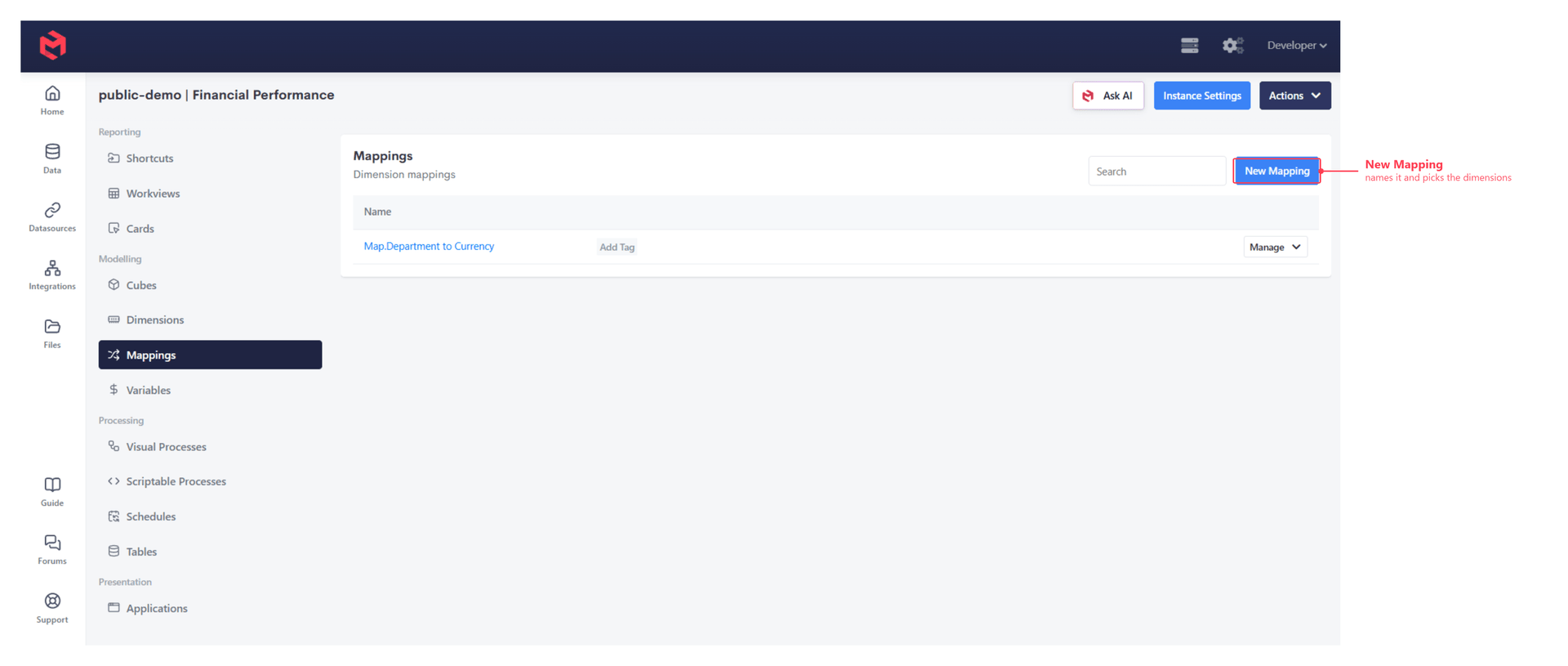
Open Mappings (under Modelling in the model's navigation panel) to see every Mapping in the model.
Defining the mapping
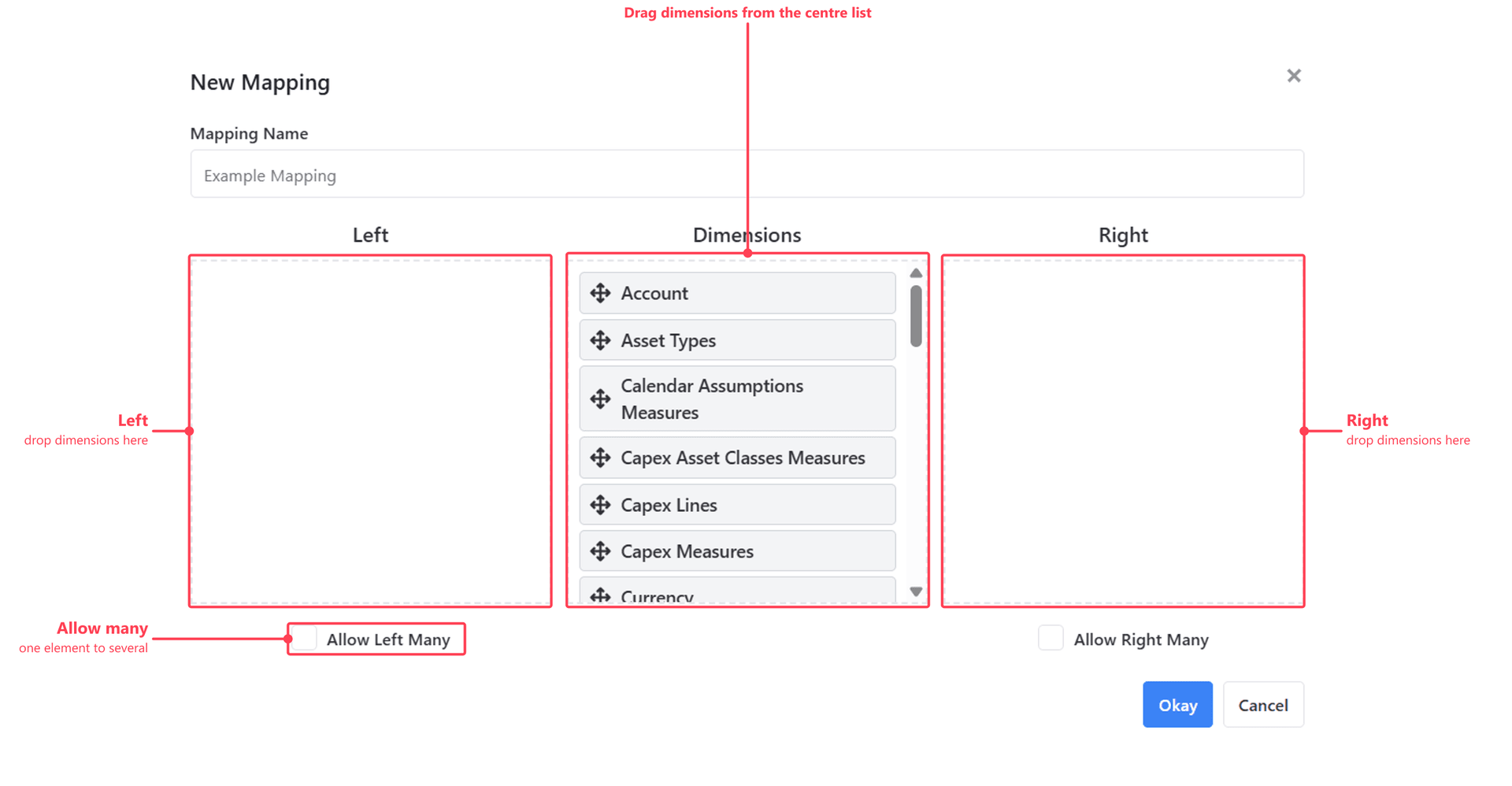
New Mapping asks for a name and the dimensions on each side. Dimensions are dragged out of the central Dimensions list into the Left or Right zone, and Allow Left Many / Allow Right Many control whether that side may match more than one element.
Editing the rows
Opening a Mapping gives you the Mapping Interface - a column for each dimension on each side, and one row per association.
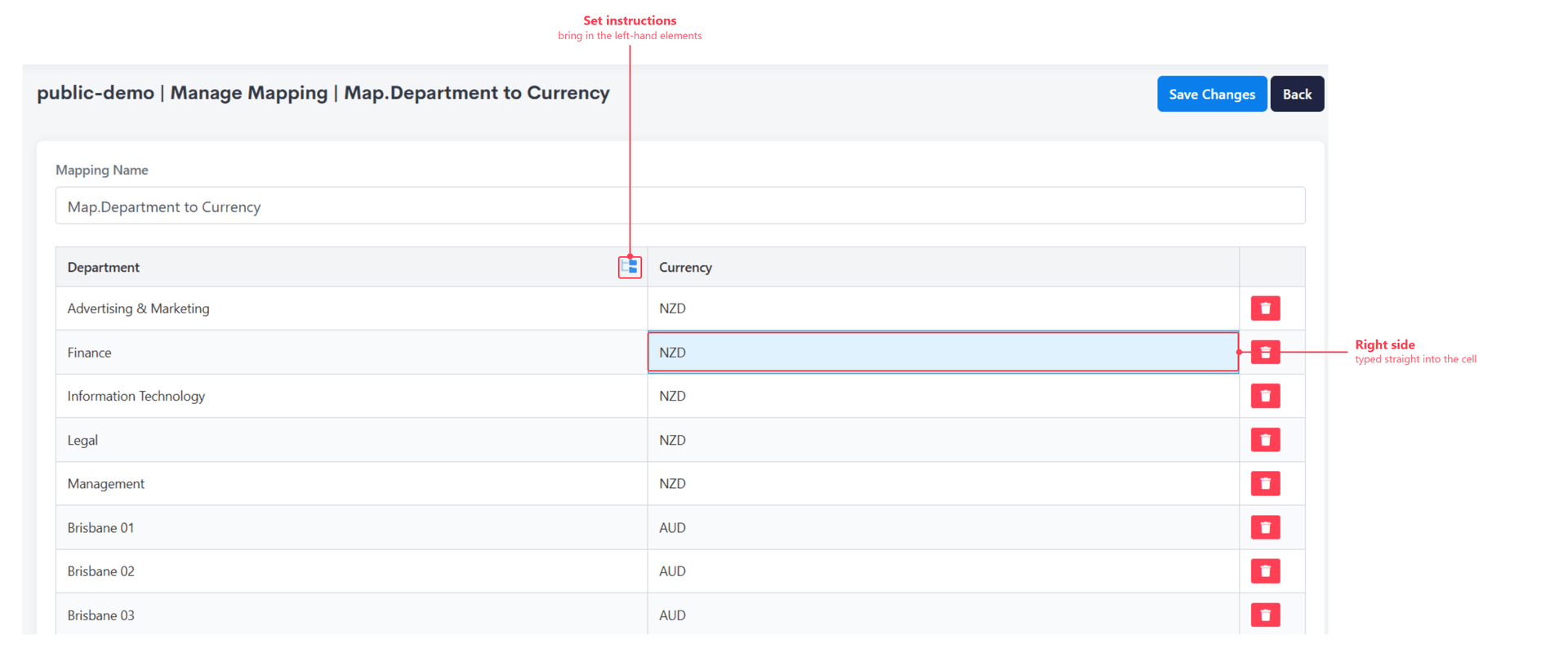
The two sides are populated differently: the left-hand elements are brought in with set instructions, whose instruction stack decides which elements appear as rows, while the element each row maps to is typed straight into the cell on the right.
Save Changes commits the grid.
Hand-edit static mappings only
The grid is the right place for a mapping that reflects a business decision and rarely changes - which department rolls up to which region, say. Where the mapping can be derived from an external system or integration, maintain it from a Process instead, so it can be rebuilt at scale and the automation is preserved rather than re-keyed by hand.
Both halves - the definition and the rows - can equally be built by a Process, and larger mappings usually are. A Mapping derived from a source system is typically rebuilt on a schedule rather than hand-maintained.
The relevant process functions are:
| Function | Purpose |
|---|---|
mapping.create | Create a mapping, specifying the dimensions on each side. |
mapping.exists | Test whether a mapping is already present. |
mapping.rowAdd | Add a row associating left keys with right keys. |
mapping.rowUpdate | Change the keys held against an existing row. |
mapping.rowDelete | Remove a single row. |
mapping.findUsingLeft | Resolve left keys to their right-hand match. |
mapping.findUsingRight | Resolve right keys to their left-hand match. |
mapping.wipe | Clear every row, keeping the mapping itself. |
mapping.delete | Remove the mapping entirely. |
A common pattern is to wipe and rebuild rather than reconcile - mapping.wipe followed by a loop of mapping.rowAdd - so the mapping always reflects the current state of its source.
js
mapping.create("Date to Month", ["Date"], ["Month"], false, true);
mapping.wipe("Date to Month");
mapping.rowAdd("Date to Month", ["2020-01-02"], ["2020 - Jan"]);
Using a Mapping in a Cube Formula
Within a cube formula a Mapping is read through MAPPING, which processes the mapping in a given direction using the elements of the cell being calculated as its input. The direction argument is "LR" for left-to-right or "RL" for right-to-left.
MAPPING is most often passed to LINKBY, which sources a value from another cube using the mapping to resolve the element it can't otherwise determine:
js
LINKBY("SourceCubeName", ["Element 1", "Element N"], MAPPING("Mapping Name", "LR"))See LINKBY References for when this applies over the other reference types.
To read the mapping without sourcing a value through it, MAPPEDELEMENT returns the element a mapping resolves to for a named dimension. Given a cell against the Date element 2020-01-02, MAPPEDELEMENT("Map Date to Week", "Week", "LR") returns the associated week.
Re-evaluate feeds after changing rows
Cube feeds that use a mapping need re-evaluating when its rows change. A Process that rebuilds a mapping should call cube.reevaluateMapping afterwards so dependent cells pick up the new relationships.
Related
- Model Objects - where Mappings sit among the model's other object types
- Mapping Functions - the full process function reference
- Example Processes: Mapping Processes - worked mapping builds