
Understanding a Cell Address
A cell in a cube is identified by picking one element from every dimension - its address. Each per-dimension pick takes one of two forms:
Parent element
Hierarchy Name»Element NameLeaf element
Element NameHierarchy Name is only ever present on a parent element, and only when needed - see Direct References for exactly when it's required in a formula.
Cell reference vs. cell address - don't confuse the two
A cell reference, written in a formula, can optionally start with Dimension Name: to prevent ambiguity if the element you're picking exists in more than one dimension of the cube.
A cell's actual address never includes the dimension name. A cube defines its dimensions in a fixed order when it's built - a Line Planning cube always has Time first, for example - so which dimension a given position belongs to is already determined by where it sits, not by a name written into it.
This page is about the part of that address you will see: the hierarchy prefix, and why it shows up on some elements but not others.
Breaking down a real address
Here's an actual Explain Value trace from a Line Planning cube, whose dimensions are Time, Scenario, Account, Line Measures, and Measures:
Line Planning - 2025 - Feb, Budget - Draft, Default»Net Result, Default»All Lines, Amount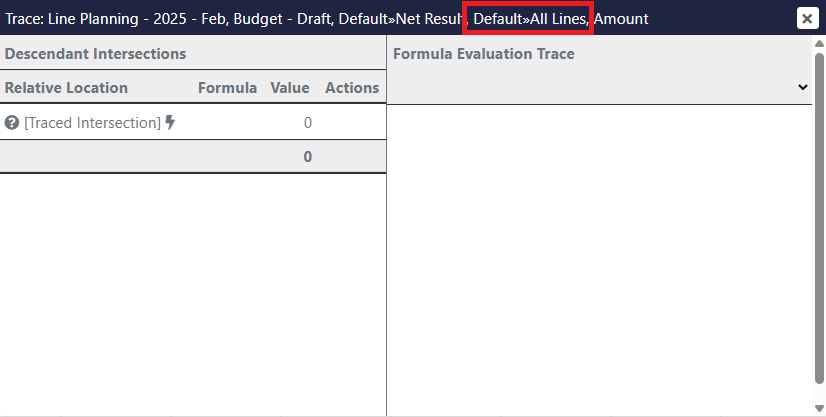
| Dimension | Address segment | Leaf or parent? |
|---|---|---|
| Time | 2025 - Feb | Leaf - no », so it's already unique without a hierarchy prefix |
| Scenario | Budget - Draft | Leaf - no », same reasoning |
| Account | Default»Net Result | Parent (consolidation) - parent elements always carry a hierarchy prefix, whether or not Net Result actually exists in another hierarchy too; Default confirms exactly which one it resolved against |
| Line Measures | Default»All Lines | Parent (consolidation) - same reasoning: the prefix is there regardless of whether All Lines happens to be duplicated elsewhere |
| Measures | Amount | Leaf - no ». The Measures dimension is the one typically used to define what type of data a cell holds - Amount, Units, Count, and so on |
No » means a leaf, not a parent
A leaf-level element belongs to the dimension itself, not to any one hierarchy's structure, so it's already unique without a hierarchy to disambiguate it - it never gets a Hierarchy» prefix. If you see one in an address, the element it's attached to is a parent (consolidation) element specifically, since only parents can collide by name across a dimension's different hierarchies.
Why the hierarchy matters
Element names aren't required to be unique across a dimension's hierarchies. The same name can exist as a parent element in more than one hierarchy, each grouping a completely different set of children beneath it - a dimension might have an All Lines parent in its Default hierarchy and a different All Lines parent in an alternate hierarchy built for another purpose.
Written on its own, All Lines is ambiguous - it could mean either one. Default»All Lines isn't.
This is also why Element Instructions in a Set Editor record the hierarchy alongside the element they picked, and why removing that specific parent-hierarchy pairing later doesn't necessarily break the set - see that page for the exact fallback order MODLR follows before giving up.
Reading a cell's actual address
To see the full, resolved address behind any cell, right-click it in a Workview or Card and choose Explain Value - also available from the MODLR ribbon in the Excel Add-in, for a cell containing a CubeGet/CubeGetFirst formula. The trace's title bar shows the complete address, one Hierarchy»Element pair per dimension - the Line Planning trace above is exactly this.
See Direct References for using this addressing to write formulas, and Element Instructions for how it applies to building a set.