
Using MODLR Data in External Systems
A system outside MODLR - a BI tool, a data warehouse, a downstream application - generally needs two things before it can do anything useful with a MODLR model:
- The numbers. The values held in a Cube, at whatever grain the model holds them.
- The structures. The Dimensions and Hierarchies those numbers roll up through - what consolidates into what, in what order, with what sign.
Numbers without structures are a flat list of codes that nothing can group. Structures without numbers are an empty chart of accounts. The recommended pattern supplies both the same way: export each to a Table in the instance's Internal Datastore on a schedule, and let the external system query that database directly.
Why not just call the API?
Because a bulk read is the one thing the Restful API is least suited to. It is a function interface rather than a query interface, so the engine resolves and serialises the whole result before anything comes back, using the same memory and processing that serves your users. A database read pushes the filtering into the query and runs against the Datastore's own memory allocation instead. The full reasoning is here.
The exports
| Process | Produces | |
|---|---|---|
| Numbers | Utility.Export.Cube to Table | One table per Cube - a column per Dimension, plus value. |
| Structures | Utility.Export.Dimensions to Table | One table for all Dimensions - a row per parent/child relationship, per Hierarchy. |
| Structures, flattened | Utility.Export.Dimension Descendants to Table | One table for all Dimensions - a row per element and each of the leaf elements beneath it, at any depth, with the sign it consolidates with. |
The two structure exports are complements. The parent/child form is what you use to draw a Hierarchy or walk it a level at a time; the flattened form is what you filter and join on, because it turns "everything under X" into an equality rather than a recursive query. Most integrations end up using the flattened table for the joins and the parent/child table for display.
All three truncate and reload rather than dropping and recreating, so a report pointed at any of them keeps working across runs.
Setting it up
- Run the exports against the Cubes and Dimensions the external system needs. Export only what it should see - see Governance below.
- Schedule them to run after the builds that feed them, typically overnight. The external system then reads a set of tables that are consistent as at the last run.
- Create a datastore user for the external system and have port 3306 opened for the instance. If the connection should come through the Gateway rather than direct to the instance, see Accessing MySQL via Gateway.
- Point the tool at it. The Internal Datastore is MySQL (MariaDB), so BI and ETL tools connect over their standard JDBC/ODBC drivers with no custom client to write.
Querying them together
The Cube export holds element names in its Dimension columns, and the structure exports hold the relationships between those names - so they join on the element name.
Roll the Account Dimension up to a parent, at any depth, respecting how each leaf consolidates:
sql
SELECT      c.department,
            c.time,
            SUM(CAST(c.value AS DECIMAL(18, 4)) * d.weight) AS total_revenue
FROM        `cube_data`.`profit_and_loss`               c
JOIN        `dimension_data`.`dimension_descendants`    d
       ON   d.dimension = 'Account'
      AND   d.hier      = 'Default'
      AND   d.child     = c.account
WHERE       d.parent    = 'Total Revenue'
GROUP BY    c.department, c.time;
Four things to note:
valueis exported as text. A Measures Dimension can hold String elements as well as Numeric ones - aCommentmeasure beside anAmountone - and every measure shares the singlevaluecolumn, so the Cube export has to write it as aVARCHAR. Filter to a numeric measure and cast before aggregating; the filter is what keeps text out of theSUM.- Every
childis a leaf. The flattened export writes only bottom-of-tree elements intochild- an intermediate consolidation appears inparentand nowhere else. There is nothing to filter out, and no way to accidentally sum a subtotal alongside the leaves beneath it. weightcarries the sign, already compounded. A Hierarchy can subtract a child from its parent, and that sign applies at one level - so a leaf's effect on an ancestor several levels up is the product of every sign in between. The flattened export stores that product per pair, which is why the same leaf can be+1intoCost of Salesand-1intoGross Profit. Multiply by it and the query matches what MODLR consolidates.- Changing the depth costs nothing.
d.parentcan name a top-level total or a sub-sub-total; the query is identical either way. Against the parent/child table the same question reaches one level only, or needs a recursive CTE - there is a worked example on that page.
Multiply by weight even where every weight is 1
Models that hold cost accounts as negative values and add them at every level have a weight of 1 throughout, and SUM(value * weight) gives the same answer as SUM(value). Writing the multiplication regardless costs nothing and keeps the query correct if the model later changes to subtracting positives.
Worked example: reproducing a Workview cell
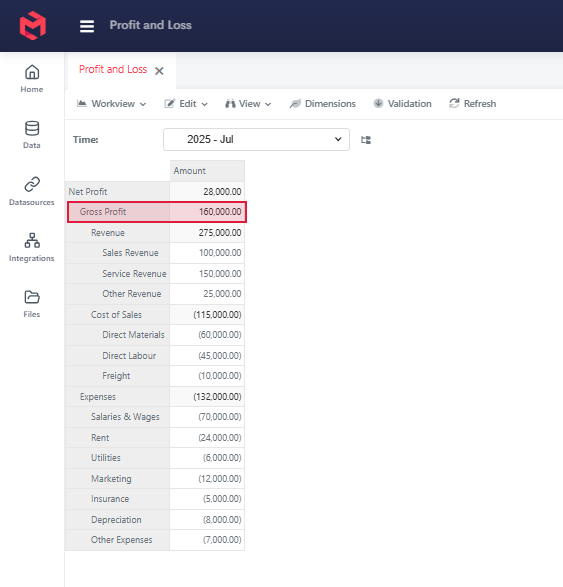
The Workview above is the Profit and Loss Cube for July 2025. The highlighted Gross Profit figure of 160,000.00 is addressed in MODLR as:
vb
["Time:2025 - Jul", "Profit and Loss Account:Default»Gross Profit", "Profit and Loss Measures:Amount"]Gross Profit holds no value of its own - it is a consolidation of the six accounts beneath Revenue and Cost of Sales. Reproducing it outside MODLR means finding those six accounts and summing their Cube values.
How the branch lands in each table
The Cube export writes one table per Cube, so Profit and Loss becomes cube_data.profit_and_loss with a column per Dimension. The six accounts that make up Gross Profit look like this:
| time | profit_and_loss_account | profit_and_loss_measures | value |
|---|---|---|---|
| 2025 - Jul | Sales Revenue | Amount | 100000 |
| 2025 - Jul | Service Revenue | Amount | 150000 |
| 2025 - Jul | Other Revenue | Amount | 25000 |
| 2025 - Jul | Direct Materials | Amount | -60000 |
| 2025 - Jul | Direct Labour | Amount | -45000 |
| 2025 - Jul | Freight | Amount | -10000 |
The parent/child export records the branch a level at a time, so Gross Profit appears both as a child of Net Profit and as the parent of two consolidations. Filtering it on parent = 'Gross Profit' returns Revenue and Cost of Sales - neither of which holds a value:
| parent | child | child_position | is_leaf | weight | depth |
|---|---|---|---|---|---|
| Net Profit | Gross Profit | 0 | 0 | 1 | 1 |
| Gross Profit | Revenue | 0 | 0 | 1 | 2 |
| Gross Profit | Cost of Sales | 1 | 0 | 1 | 2 |
| Revenue | Sales Revenue | 0 | 1 | 1 | 3 |
| Revenue | Service Revenue | 1 | 1 | 1 | 3 |
| Revenue | Other Revenue | 2 | 1 | 1 | 3 |
| Cost of Sales | Direct Materials | 0 | 1 | 1 | 3 |
| Cost of Sales | Direct Labour | 1 | 1 | 1 | 3 |
| Cost of Sales | Freight | 2 | 1 | 1 | 3 |
Getting from Gross Profit to the six accounts through that table takes two hops, or a recursive query.
The descendants export has already done those hops. Filtering it on parent = 'Gross Profit' returns exactly the six accounts that hold data. Revenue and Cost of Sales appear nowhere in the child column, because only leaves are written there:
| dimension | hier | parent | child | weight |
|---|---|---|---|---|
| Profit and Loss Account | Default | Gross Profit | Sales Revenue | 1 |
| Profit and Loss Account | Default | Gross Profit | Service Revenue | 1 |
| Profit and Loss Account | Default | Gross Profit | Other Revenue | 1 |
| Profit and Loss Account | Default | Gross Profit | Direct Materials | 1 |
| Profit and Loss Account | Default | Gross Profit | Direct Labour | 1 |
| Profit and Loss Account | Default | Gross Profit | Freight | 1 |
Revenue and Cost of Sales still get rows of their own as parents - three each - so they remain queryable in their own right.
The query
sql
SELECT      SUM(CAST(c.value AS DECIMAL(18, 4)) * d.weight) AS gross_profit
FROM        `cube_data`.`profit_and_loss`               c
JOIN        `dimension_data`.`dimension_descendants`    d
       ON   d.dimension = 'Profit and Loss Account'
      AND   d.hier      = 'Default'
      AND   d.child     = c.profit_and_loss_account
WHERE       d.parent                   = 'Gross Profit'
  AND       c.time                     = '2025 - Jul'
  AND       c.profit_and_loss_measures = 'Amount';
gross_profit
------------
160000.0000Which is the Workview figure: 100,000 + 150,000 + 25,000 - 60,000 - 45,000 - 10,000.
The profit_and_loss_measures = 'Amount' predicate is doing two jobs here. It picks the figure you want, and it keeps the SUM numeric: a Measures Dimension can hold String measures alongside numeric ones, so the export's value column is a VARCHAR, and casting it without first restricting to a numeric measure risks meeting a comment.
Point d.parent at Net Profit instead and the same query returns 28,000 across thirteen accounts; point it at Revenue and it returns 275,000 across three. Nothing else about the query changes.
Why every weight here is 1
The cost accounts in this model are stored as negative values - the Workview shows them in parentheses - and every level of the Hierarchy adds its children. So the whole branch carries weight = 1, and multiplying by it changes nothing.
A model built the other way, holding costs as positives and giving Cost of Sales a -1 weight, produces a different table for the same Workview:
| parent | child | weight |
|---|---|---|
| Gross Profit | Sales Revenue | 1 |
| Gross Profit | Service Revenue | 1 |
| Gross Profit | Other Revenue | 1 |
| Gross Profit | Direct Materials | -1 |
| Gross Profit | Direct Labour | -1 |
| Gross Profit | Freight | -1 |
The Cube values would all be positive, and SUM(value) alone would return 390,000. SUM(value * weight) returns 160,000 from either model, which is why the multiplication belongs in the query whichever way your model is built.
Keeping the export to what's needed
Both exports truncate and reload, so each table is a full snapshot as at the last run rather than a change log. Keeping them to a sensible size is a matter of scoping the export itself, not of filtering afterwards.
The Dimension export takes a list of Dimensions to include and a list of Hierarchies to skip. The Cube export runs per Cube, and its slice can be narrowed the same way. A production export usually drives that scope from the model rather than a hardcoded list:
- Hold the scope in a small control Cube - which Scenarios are published externally, which years each one covers - and read it at the top of the process. A Scenario nobody reports on then costs nothing to skip.
- Restrict the slice on the Dimensions carrying the volume, usually Time and Scenario, rather than exporting every year the model has ever held.
- Give a single-purpose consumer its own table. Where an external system needs one entity or one Scenario, export that subset rather than exporting everything and relying on the consumer to filter.
Scoping at the source is also what keeps the export window short, which matters because the export is the one part of this pattern that does touch the engine.
Governance
Direct database access sits outside MODLR's own security model. Instance Security and Access Tags govern what a user can reach inside the platform; a datastore account connecting over SQL sees whatever has been exported into the tables it can read, and nothing filters it per user.
That makes the export itself the control point:
- Export only the Cubes, Dimensions and Hierarchies the external system is entitled to. The Dimension and Hierarchy lists in the Dimension export, and the choice of which Cubes to run the Cube export against, are where you draw that line.
- Give the external system its own datastore account rather than sharing one, so access can be revoked without affecting anything else.
- Where the external system only needs a subset - one entity, one scenario - it is usually better to export that subset to its own table than to export everything and rely on the consumer to filter.
When the API is the right answer
The pattern above covers reading data out. The Restful API remains the right tool for the things a database read cannot do - triggering a Process, writing data back into a Cube, or managing model objects from another system.
External use of the API is arranged case by case: the authentication method and credentials are issued per customer, and the reference material for the functions involved is provided directly. Contact the MODLR team describing what you are trying to achieve, and we will set it up and advise on the approach.