
Business Central Integration Package
This package contains the following processes:
- Business Central.Export.All
- Business Central.Export.Company
- Business Central.Export.Non Time Data
- Business Central.Export.generalLedgerEntries
Setup Instructions
To complete setup of the Business Central Integration Package, follow these steps:
- Download this package.
- Upload the package to your instance, importing all processes to the intended model.
- Download the Business Central Integration Library.
- Update the compulsory variables in the library — these are the variables required for the integration with Business Central — per the Business Central Integration Library documentation.
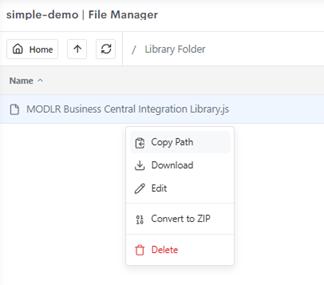
- Upload the Business Central Integration Library to your file manager.
- Copy the file path.
- Navigate to Variables and create a new variable called
BusinessCentralIntegrationLibraryPath.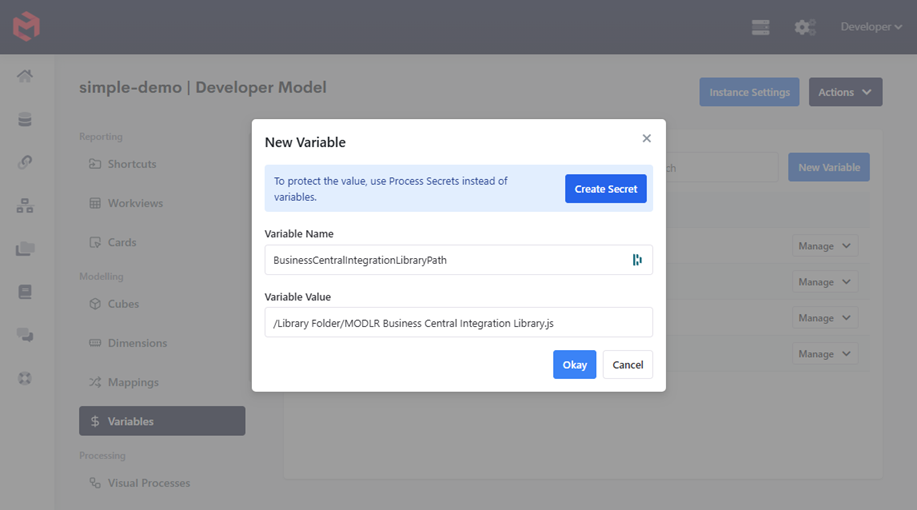
- Run the process
Business Central.Export.All.
Note, if you do not have a Time dimension, the export of Business Central.Export.generalLedgerEntries Entries will fail.
INFO
Processes listed as part of the Business Central Package require the Business Central Integration Library. This library requires configuration of the variables relating to your Business Central environment.