
CubeGet
Retrieves data from a cube based on the intersection of elements.
See FAQ for details about function runtime ordering.
js
CubeGet(applicationName, cube, ...elementNameN)Parameters
applicationName- The name of the application through which to access the model.cube- The identifier of the cube.elementName1- An element for each dimension within the cube which when used, finds a specific intersection.elementName2- An element for each dimension within the cube which when used, finds a specific intersection.elementNameN- An element for each dimension within the cube which when used, finds a specific intersection.(optional)
Example
js
CubeGet("Performance Management", "General Ledger", "Actual", "2020", "Jan", "Revenue", "Marketing", "Amount")This will return the value at the provided intersection for the cube "General Ledger".
Using a hierarchy prefix
By default, an element is looked up in the dimension's default hierarchy. To use an element from another hierarchy, put the hierarchy name before the element, separated by the » Hierarchy Prefix:
js
CubeGet("Sales Training Application", "Sales", 2020, "Actual", "All Customers", "Locations by Sales Region»Region A", "All Products", "All Sales Channels", "All Shipping Methods", "Revenue")Reading a CubeGet in a worksheet
In practice the arguments are cell references rather than literals, so one formula can be filled across a range and each cell resolves its own intersection.
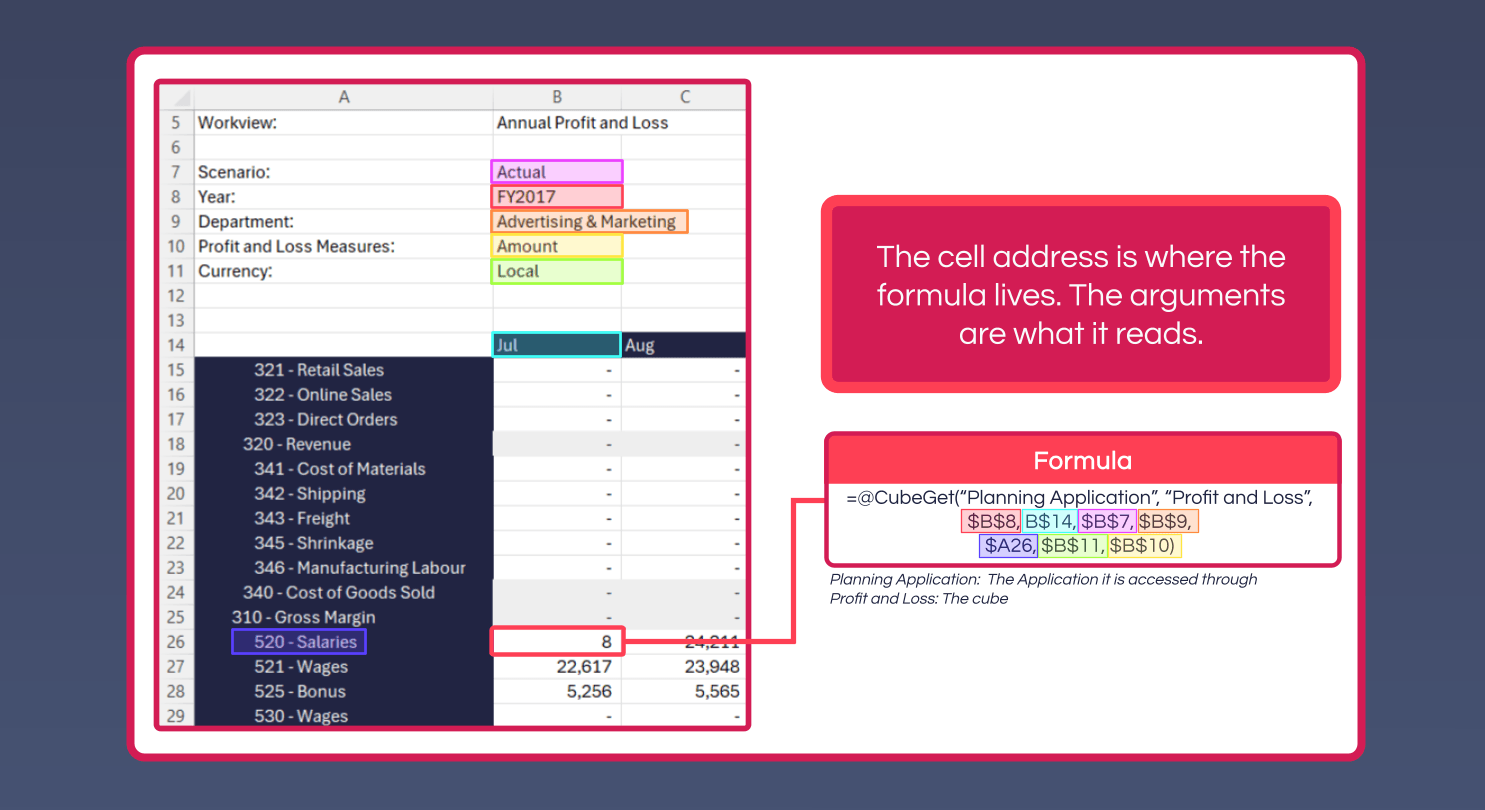
The cell address is where the formula lives; the arguments are what it reads. In the example above:
"Planning Application"- the Application the model is accessed through"Profit and Loss"- the cube- The remaining arguments point at the selections above the grid (
$B$7-$B$11, absolute so they don't shift), plus the account from the row ($A26) and the month from the column header (B$14)
Mixing absolute and relative references this way is what lets a single formula be filled across the whole report: the selections stay pinned, while the account and month follow the cell.
Build the formula once
Create Formula on the ribbon builds a CubeGet from the model structure rather than requiring the argument order to be typed by hand.